
Why is the padelshooter so special?
The Padelshooter is so special because it can mix low and high balls in 1 training. You can produce and download trainings. It has many features for padel, that separates it from the regular tennismachines, like dividing the court in left / right (or both), protection for not shooting in the net at low speeds, extra delay after only high balls, etc. It has 3 screens to play with the machine: to immediately start with the machine without reading a manual, more advanced inbuilt trainings with mixed height shots and make own / download “ready made” trainings for your special needs.
App (Android & iPhone) controlled machine: 3 screens
Easy from start
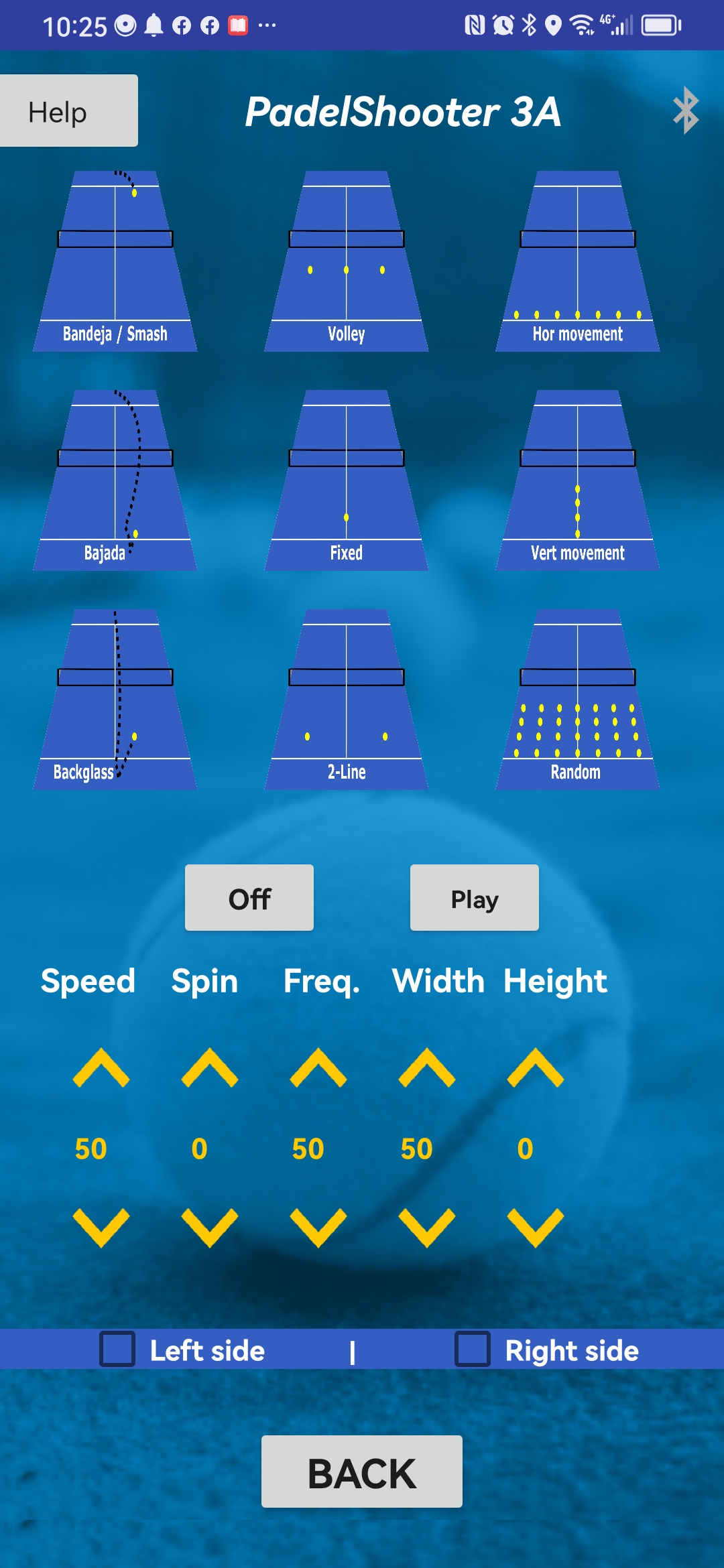
While the 1st Padelshooter was a bit "overwhelming" and you needed to get used to the machine and read the manual, an "Easy use" screen has been added to start immediately with the machine:
-
Press a training, you might change the standard settings, select the left/right side (or both) and press Play.
-
Training for bandeja or smash.
-
Training for volleys at 3 postitions (randomly left/middle/right). Set the Width different to set these positions more close or wide (or 1 position with "0").
-
Horizontal movement to vary the balls between forehand and backhand. The area could be set closer or wider ("Width").
-
Bajada, to play the high ball after bouncing at the back wall.
-
Fixed position, to easily set 1 point to train just 1 shot, just as many other ball machines can. Change the Width, Height, Speed, Spin, Frequency whatever you want.
-
Vertical movement, for playing the balls at 1 Width position and variable heights.
-
Backglass balls, for returning (fast) balls with backspin after hitting the backglass.
-
2-line balls for offering balls to 2 players continuous or for training just a forehand, backhand, forehand, etc. The distance between the 2 positions could be set with "Width".
-
Random balls, for playing balls in a horizontal and vertical area randomly. The horizontal and vertical area could be set as you want.
All balls could be easily set with the spin you want. Also the settings of every training could be “finetuned” for the speed, spin, frequency, horizontal and height position, exactly what you prefer in your trainings.

Many inbuilt Padel trainings
Together with Padel Professionals, we developed trainings that are very special for Padel:
-
Playing Bandejas and Volleys in 1 training at several horizontal positions with the Bandeja and Volley height you choose yourself.
-
Trainings with random balls at the width and height range that you easily set yourself.
-
Cross balls with volley and lob ball at different horizontal positions.
-
Select your trainings for playing with 1 or 2 players, the settings for all the trainings could be set different (think about frequency of balls, width of the balls).
-
Limit your trainings to parts of the Padelcourt (left or right side or whatever part you want)
-
Set a normal pause after each ball and set an extra pause after only the high balls, just for your level or to train to let the high ball first bounce on ground and backwall and then hit back.
-
When playing with random heights, set the upper and lower position so that no balls bounce to backglass and no balls go into the net.
-
Set the settings exact for your level for future use.
All balls could be easily set with the spin you want. Also the settings of every training could be “finetuned” for the speed, spin, frequency, horizontal and height position, exactly what you prefer in your trainings.

Making your own trainings/programs
Every player likes to have his/her own trainings which are just a little bit different than the "standard" Padel trainings:
-
A program of max 9 shots could be made for your own trainings. For every shot, you can set the speed, spin, frequency and position (height and horizontal).
-
Add new shots, copy existing shots, change shot values while running the program, delete shots and much more.
-
Create and run the programs and give your preferred name to the training, so you can easily find which training to use.
-
We made "ready made" downloadable programs by just pressing a button. A good start to offer programs to newbie's with the Padelshooter.
- Copy the programs on your phone without having an internet connection, so you can always play your preferred trainings
Copying the programs from our website is an easy way to learn making the programs yourself. Just change one of the programs you downloaded, change like you prefer and save on your own phone.
All balls could be easily set with the spin you want. Also the settings of every training could be “finetuned” for the speed, spin, frequency, horizontal and height position, exactly what you prefer in your trainings.
Combinations of shots
For the most advanced Padel trainings
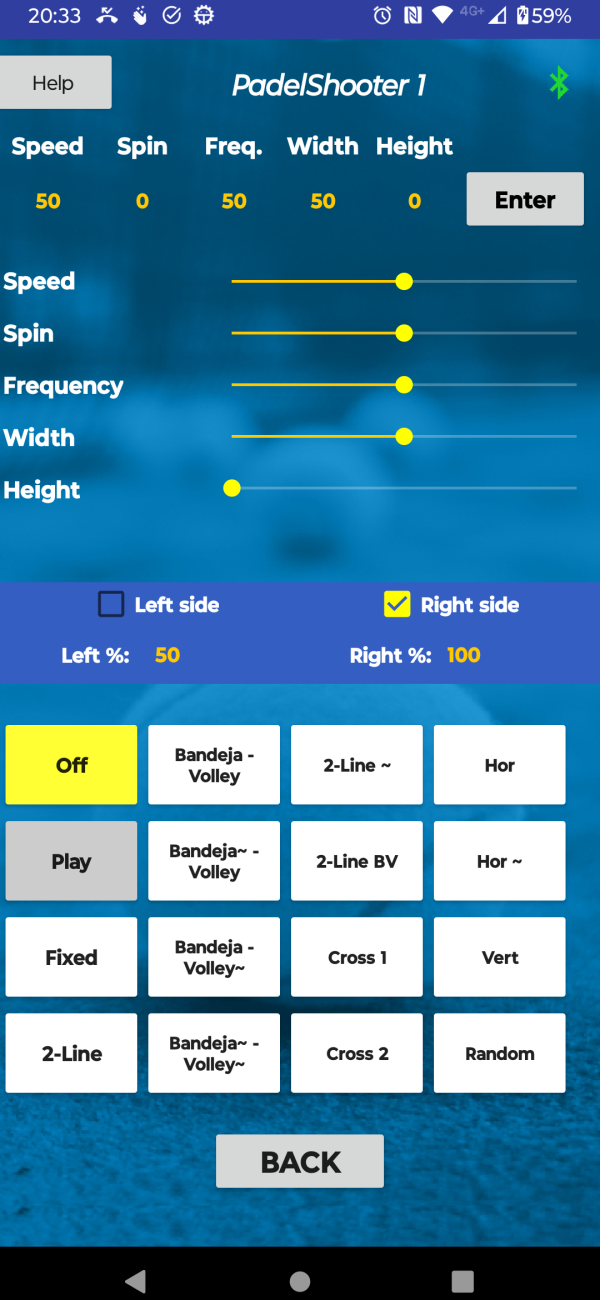
When you buy a Padel machine that can play (almost) everything you want, you need an app to full control the machine. You have the time to get used to the machine and how to use the app and you can then train whatever you want. This app page is therefore used for players that want to "get everything" out of their Padel machine.
For Your own trainings (programs)
Make your own trainings
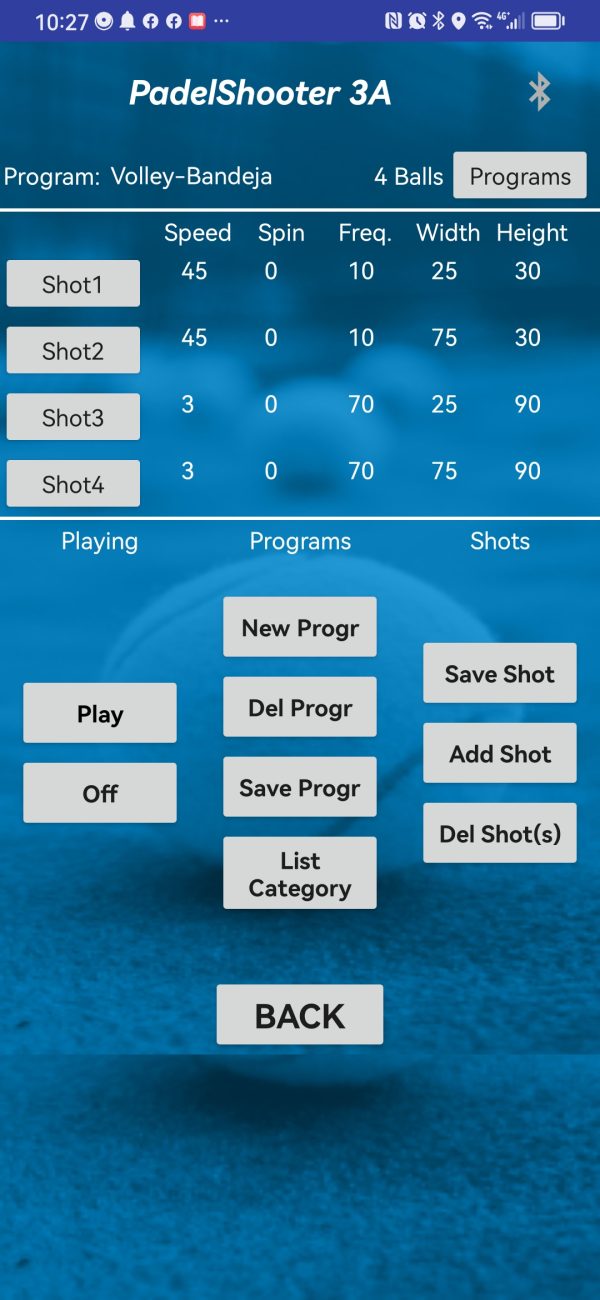
When you know all the inbuilt trainings of the Padelshooter and you want to create your own trainings, you can use the "Programs" screen. You can program max. 60 shots at every position at every speed/spin and frequency for every single shot. Making your own programs is easier by just downloading the many Padelshooter "ready made" programs with 1 button click and then make some changes.
For Easy use (Padelcenters)

Easy use with pre-programmed training
When a player uses the PadelShooter for the first time or only hire the machine for 1 hour, there is no time "to get used to the machine". Then the machine should easily start doing the training that you want. Therefor this app is meant for people that hire the machine in a Padelcenter and immediately want to work with the machine by answering some "easy questions". This app can do many trainings but not all the machine can do.
The Padelshooter initially featured an advanced “Trainings” screen and a flexible “Programs” screen, which were highly appreciated by technical users. However, for those who preferred a simpler, more intuitive experience, we introduced a new “Easy Use” screen. This addition allows users to start playing with the machine immediately, without needing to read extensive manuals, while also making the advanced features more accessible for everyone.
History of Padelshooter
Future of Padelshooter
Apps
The Padelshooter app is now in both stores: on Google Play for Android and in the Apple App Store for iPhone (search "Padelshooter"). Plus, meet the new Padelcenter App—a tool for Padel centers to create custom training programs on the "Start Here" and "Training" screens. Empower your center with personalized, dynamic training experiences!
PadelShooter MAX
The Padelshooter Smart has been available for some time, and a new model between the original Padelshooter 3B and the Smart is coming soon. While the MAX is slightly smaller than the 3B, it offers a key advantage: a wider shooting hole that covers a larger part of the padel court's horizontal shooting area, enhancing your training experience.
Dynamic upgrade machine
The Padelshooter machine operates on its own software, functioning well as is, but future upgrades could enhance its performance. A dynamic upgrade feature via the app is being considered, with plans already in motion to explore this potential improvement.