
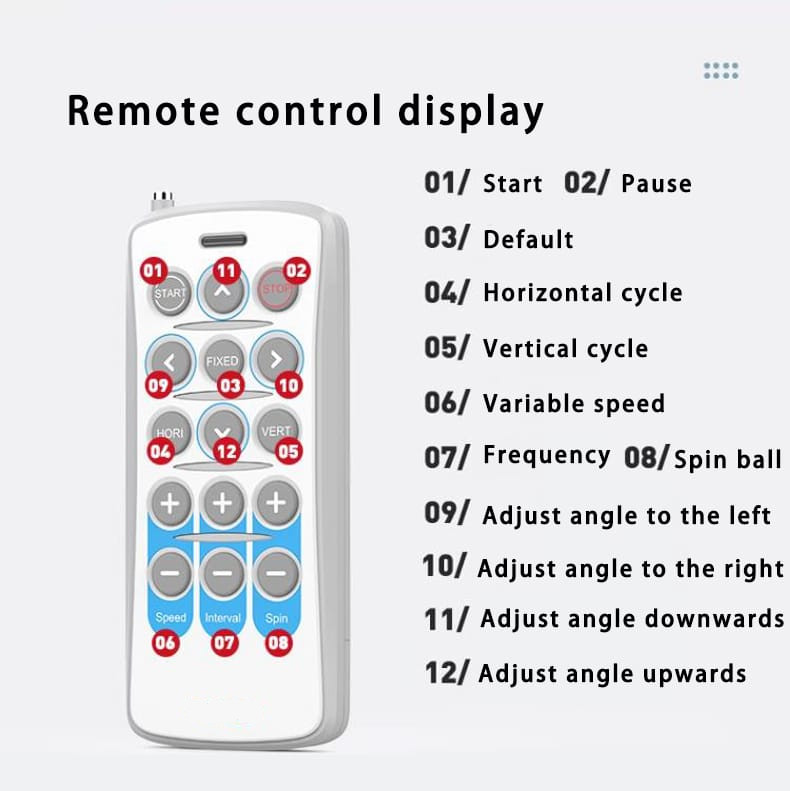
Every current Padelshooter comes with a handy 15-button remote control. It is a small accessory that is easy to overlook, but once you understand what it is built for, it quickly becomes one of the most practical tools on the court. The key is knowing its role: the remote is not meant to replace the app, it is meant to work alongside it.
The App Drives, the Remote Fine-Tunes
The Padelshooter app is the main way to control your machine. It offers far more options, a clearer overview of every setting, and is simply easier to operate than a row of buttons. So you should always start your session from the app: pick your exercise, set it up, and let the machine begin.
The remote control then takes over for the small adjustments. Once a training session is running from the app, the remote lets you tweak the details without ever putting your phone down or walking back to it. Think of the app as the place where you plan and launch, and the remote as the tool you keep in your hand while you play.
What the Remote Does Best
There are two situations where the remote really shines during an active session:
- Pause shooting without stopping the machine. You can interrupt the stream of balls while keeping the selected exercise active. Catch your breath, collect balls, or talk through a point, then resume exactly where you left off, with all your settings intact.
- Change settings on the fly. Without stopping the running training, you can adjust speed, spin, frequency, and position (both height and width). This makes it effortless to raise the intensity mid-drill, soften a shot that is coming in too hard, or shift the target zone, all in real time.
Because these changes happen live, you stay in your rhythm. There is no need to stop, unlock your phone, find the right menu, and start over. You simply press a button and feel the difference on the very next ball.
Three Exercises You Can Start Without the App
The remote also acts as a backup. If your phone runs out of battery in the middle of a session, you are not stuck. Using the remote alone, you can still start three built-in exercises directly on the machine:
- FIXED – fixed-point shooting, where every ball lands in the same spot so you can groove a single stroke.
- HORI – a horizontal two-line drill that moves you side to side across the court.
- VERT – a vertical pattern ideal for volley and bandeja practice at the net and mid-court.
These three give you a complete, usable workout even when the app is unavailable, so a dead phone never has to end your training.
A Word of Warning: Keep Track of It
One practical tip from real-world use: at clubs and padel centers where several players share the same machine, the remote control has a habit of going missing. With many hands passing it around, there is a real risk of it being left on a bench, dropped in a bag, or simply misplaced.
Make it a habit to store the remote in a fixed spot when you are done, and consider assigning one person to be responsible for it during shared sessions. A lost remote is a small object with an outsized impact on convenience, so a little care here goes a long way.
Get the Most Out of It
Used the right way, the Padelshooter remote turns every session into a more fluid, responsive experience. Plan and launch from the app, fine-tune live with the remote, and keep those three offline exercises in your back pocket for emergencies. Master this simple workflow and you will spend less time fiddling with menus and more time hitting balls.